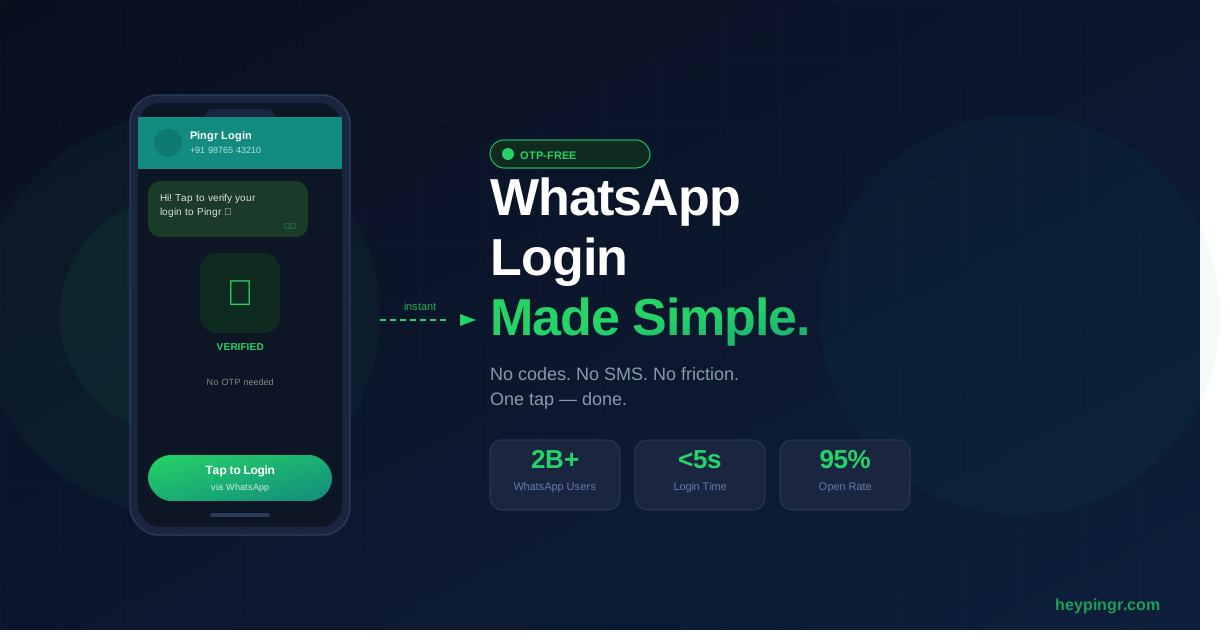
Users hate OTPs. They switch apps, wait for a message that never arrives,
and give up — taking your conversion rate with them. WhatsApp
OTP-free login solves this by letting users authenticate with a
single tap inside WhatsApp, with no code to copy, no SMS to wait for, and
no friction at all. In this guide you’ll learn exactly how it works, why
it outperforms every alternative, and how to integrate it into your app in
under an hour using Pingr.
What Is WhatsApp OTP-Free Login?
Traditional OTP login sends a 6-digit code over SMS or email that the user
must manually type into your app. WhatsApp OTP-free login replaces that
entire flow with a verified WhatsApp message. The user taps a button,
WhatsApp opens, they send a pre-filled message, and your backend instantly
confirms the session — no code, no typing, no waiting.
It works because WhatsApp already knows the user’s verified phone number.
When they send a message from their account, you get cryptographic proof
of identity without asking them to do anything extra. It’s the closest
thing to magic in user authentication.
Why SMS OTP Is Broken (And Costing You Users)
SMS OTP has three critical failure modes that directly hurt your business:
| Problem | Impact | WhatsApp OTP-Free Fix |
|---|---|---|
| SMS delivery delays | Users abandon after 30 seconds | Instant WhatsApp delivery |
| SIM swap fraud | Account takeovers | End-to-end encrypted session |
| International SMS costs | $0.05–$0.10 per message | WhatsApp works over data/WiFi |
| Low deliverability in some regions | Users locked out | WhatsApp has 2B+ active users globally |
| Context switching kills conversions | Up to 30% drop-off at OTP step | Stays within familiar WhatsApp UX |
According to
GSMA research,
SIM swap attacks increased by over 400% between 2022 and 2024. Meanwhile,
Statista reports that
WhatsApp is the world’s most used messaging app with over 2 billion monthly
active users. The math is simple: go where your users already are.
How WhatsApp OTP-Free Login Works (Step by Step)
The flow is elegantly simple from the user’s perspective, and secure by
design from yours:
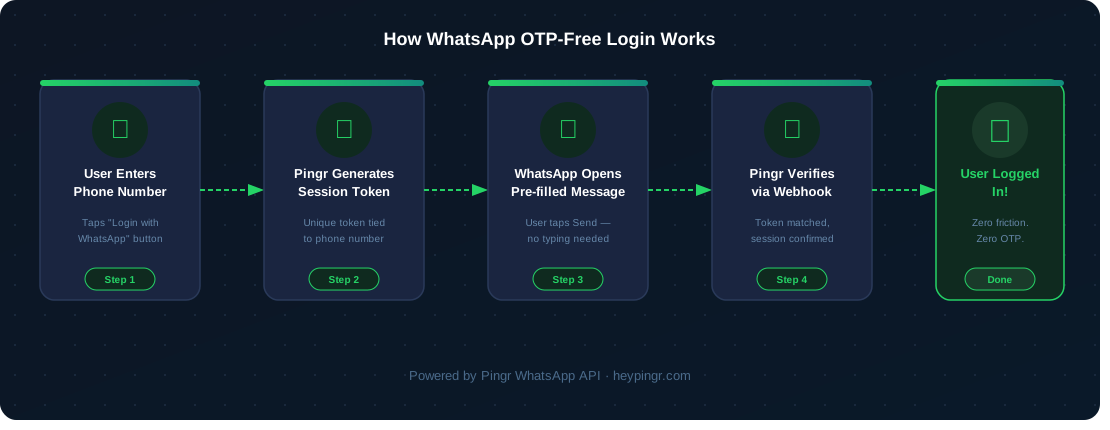
- User enters their phone number on your login screen.
- Your app calls the Pingr API to generate a unique session token.
- The user taps “Login with WhatsApp” — WhatsApp opens with a pre-filled message containing the token.
- The user hits Send. Your Pingr webhook receives the message and verifies the token.
- Pingr confirms the session to your backend. The user is logged in.
The entire flow takes under 5 seconds. There’s no code to remember,
no app to switch to, and no SMS black hole to worry about.
Integrating WhatsApp OTP-Free Login with Pingr
Pingr’s WhatsApp API handles all
the complexity — session management, webhook verification, token expiry —
so you ship in hours, not weeks. Here’s a working Node.js integration:
Step 1: Generate a Login Session
// Install: npm install axios
const axios = require('axios');

async function createWhatsAppLoginSession(phoneNumber) {
  const response = await axios.post(
    'https://api.heypingr.com/v1/sessions',
    { phone: phoneNumber },
    {
      headers: {
        'Authorization': `Bearer ${process.env.PINGR_API_KEY}`,
        'Content-Type': 'application/json',
      },
    }
  );

  const { session_id, whatsapp_url, expires_at } = response.data;

  // Redirect user to whatsapp_url — it opens WhatsApp with pre-filled message
  return { session_id, whatsapp_url, expires_at };
}
Step 2: Verify the Session via Webhook
// Express.js webhook handler
app.post('/webhooks/pingr', async (req, res) => {
  const { session_id, phone, status } = req.body;

  if (status !== 'verified') {
    return res.status(400).json({ error: 'Session not verified' });
  }

  // Find or create user by phone number
  let user = await User.findOne({ phone });
  if (!user) {
    user = await User.create({ phone });
  }

  // Issue your app's auth token
  const token = jwt.sign({ userId: user.id }, process.env.JWT_SECRET);

  // Store token against session_id so your frontend can poll for it
  await SessionStore.set(session_id, { token, userId: user.id });

  res.json({ success: true });
});
Step 3: Poll for Login Completion on the Frontend
async function pollForLogin(sessionId) {
  const maxAttempts = 30; // 30 × 2s = 60s timeout

  for (let i = 0; i < maxAttempts; i++) { await new Promise(r => setTimeout(r, 2000));

    const res = await fetch(`/api/session-status?id=${sessionId}`);
    const { token } = await res.json();

    if (token) {
      localStorage.setItem('auth_token', token);
      window.location.href = '/dashboard';
      return;
    }
  }

  alert('Login timed out. Please try again.');
}
That’s the full integration.
The complete API reference covers
additional options like custom message templates, session TTL configuration,
and multi-device support.
WhatsApp OTP-Free Login vs the Alternatives
Not all passwordless methods are created equal. Here’s how WhatsApp
OTP-free login stacks up against the most common alternatives:
- vs SMS OTP: WhatsApp delivers instantly, costs less,
and is immune to SIM swap attacks. SMS fails silently in many markets. - vs Email magic links: Email open rates average 20–30%.
WhatsApp message open rates exceed 95%. The winner is obvious. - vs Google/Apple SSO: Not every user has a Google or
Apple account, but 2 billion people use WhatsApp — including users in
emerging markets where SSO adoption is low. - vs Passkeys: Passkeys require device support and user
education. WhatsApp OTP-free login works on any phone, any OS, today.
Who Should Use WhatsApp OTP-Free Login?
This authentication method delivers the highest impact for:
- Consumer apps in India, Southeast Asia, Latin America, and
Africa — where WhatsApp is the primary communication channel
and SMS delivery is unreliable. - Fintech and gig economy platforms — where security
matters and users expect a fast, low-friction experience. - E-commerce and D2C brands — where checkout drop-off
at login is a direct revenue leak. - SaaS products with mobile-first users — where switching
apps to retrieve an SMS code is enough to lose the session.
Why Developers Choose Pingr for WhatsApp Authentication
Building WhatsApp authentication from scratch means navigating Meta’s
Business API approval process, managing webhook infrastructure, handling
session state, and dealing with rate limits — before you write a single
line of product code. Most teams spend 4–6 weeks on it.
Pingr abstracts all of that into three API calls. You get a
free API key in under two
minutes, working sandbox credentials immediately, and production-ready
infrastructure that scales with you. Teams using Pingr ship WhatsApp login
in a day, not a sprint.
Pingr also handles the edge cases: expired sessions, users who close
WhatsApp mid-flow, duplicate message deliveries, and webhook retry logic.
You focus on your product; Pingr handles the plumbing.
Security Considerations
WhatsApp OTP-free login is secure by design, but there are a few
best practices to follow in your implementation:
- Session expiry: Set token TTL to 5 minutes maximum.
Pingr does this automatically, but verify your webhook rejects expired
sessions. - One-time use: Invalidate the session token immediately
after successful verification to prevent replay attacks. - Rate limiting: Limit session creation to 5 attempts per
phone number per hour to prevent abuse. - Webhook signature verification: Always verify Pingr’s
webhook signature header before processing any session confirmation.
Ready to eliminate OTP friction from your app?
Get your free Pingr API key →
and ship WhatsApp OTP-free login today. Setup takes less than an hour,
and your users will notice the difference immediately.
Leave a Reply